Why sitters start looking beyond Rover
You've built a solid group of regulars on Rover, but a slice of every booking goes to the platform and your pay sits for days before it reaches your bank. That's usually when people start searching for Rover alternatives for pet sitters. You've also probably noticed that the owners you'd most like to keep are tied to Rover's rules, not to you.
Those three things (the service fee, who owns the client relationship, and payout timing) are what push most sitters to look for alternatives. None of them make Rover a bad deal. They just mean the decision deserves real numbers instead of a gut feeling.
Start with the fee. Rover publishes its sitter service fee in its own help centre, and Rover notes that fees can vary by country, so check the UK page rather than trusting a figure from a blog. To see what that fee adds up to over a month, plug your own numbers into the Rover fees calculator.
What Rover handles for you, and what you'd take on
It's easy to fixate on the fee and forget what it covers. According to Rover's Bookings on Rover page, sitters get paid for completed bookings through the platform, keep all tips paid through the site, and set their own cancellation policy. Rover also offers support, and bookings made and paid through Rover fall under RoverProtect, its protection programme.
Then there's demand. Owners on Rover are already searching for someone like you. Once you work independently, finding those owners is your job. So is collecting payment, dealing with a client who cancels the night before, and sorting out refunds when a visit doesn't go to plan.
- Finding new clients without a marketplace search page
- Sending invoices and collecting payment
- Enforcing your cancellation policy yourself
- Handling refunds and payment disagreements
- Keeping client, pet and access records organised
- Planning cover when you're ill or away
Who owns the client: the rule that shapes your plan
This is the part most comparison articles skip, and it changes everything. Rover's Bookings on Rover page says that if a client finds you through Rover and you then complete bookings with them off the platform, that breaks Rover's Terms of Service and can get you removed. Payment for those bookings is expected to stay on Rover too.
So going independent doesn't mean moving your Rover regulars over. It means building a separate client list from sources that have nothing to do with Rover: neighbours, friends of friends, a local vet or groomer who passes your name along, your own website. Your Rover clients stay on Rover.
That's why running both side by side is the realistic default for most sitters. Rover keeps sending you bookings, and your own setup handles the clients you found yourself.
Rover alternatives for pet sitters: your realistic options
Other marketplaces are usually the first stop. Wag, for example, doesn't publish its pay structure as a simple flat commission, which is why the figures quoted on blogs vary so much. Read each platform's own help pages for your country before signing up, and read their client rules as well. You may simply be trading one set of terms for another.
The second option is Rover plus your own setup. You keep your Rover profile active and follow its terms, and you run separate bookings and payments for clients who came to you directly. Your income doesn't hinge on a single source, which makes this the lowest-risk route.
The third is going fully independent. You keep the whole price of each booking, minus card processing and software, but every client has to come from your own effort.
Here's how the middle route can look. A sitter has eight Rover regulars and two neighbours who asked for help after seeing her out with a client's dog. She keeps the eight on Rover, books the two neighbours through her own setup, and uses them to test her policies and payment flow before growing that side any further.
When the money actually arrives
On Rover in the US, the help centre says earnings appear in your Rover account two days after you complete the service. Stripe then sends them to your bank automatically, which can take up to five working days. Rover's UK and Canadian help pages describe their own payout options, so check the UK version before you plan around a date.
On your own, you decide when to bill. You can invoice a week of drop-ins up front, take a deposit when someone books a holiday stay, or set up recurring invoices for weekly regulars. The trade-off is that collecting is now your job. Once a client pays, the money reaches your bank on your payment processor's schedule, and the first payout often takes longer while your account is verified, so read the current payout terms before you count on that cash.
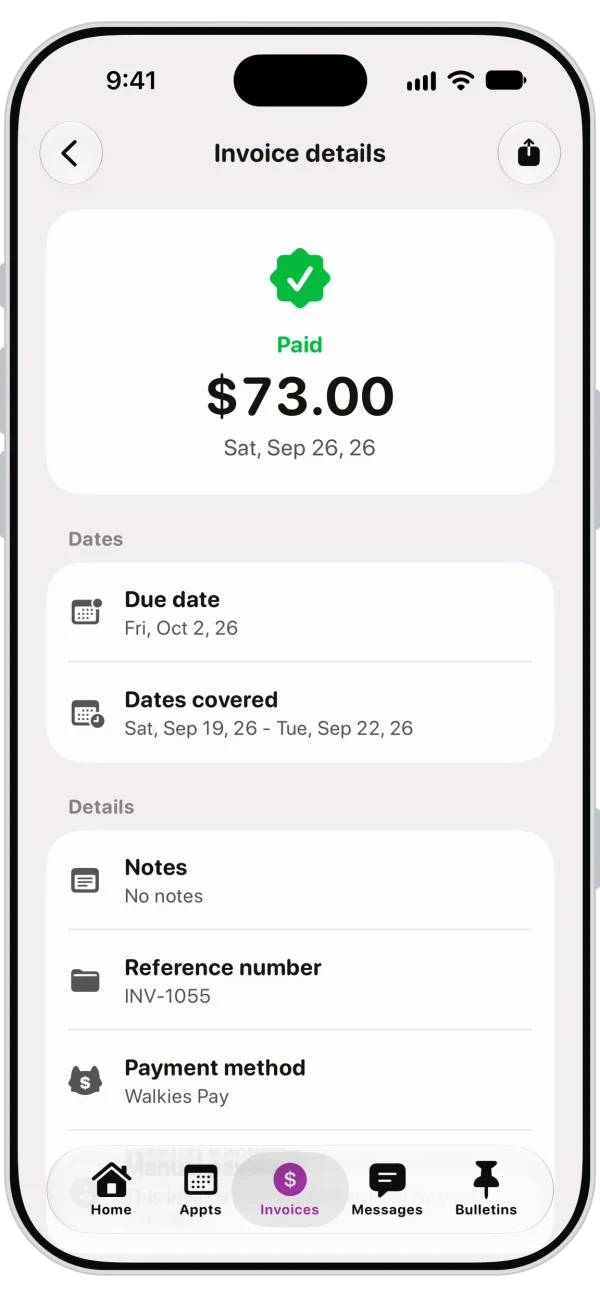
With Walkies invoices and Walkies Pay, clients pay by card, Apple Pay or Google Pay, processed by Stripe, and it works the same way in every country. Recurring invoices go out automatically, you can take deposits, and automatic late payment reminders do the nudging so you're not writing awkward texts.
A break-even worksheet you fill in yourself
Forget the slogans about keeping every penny of your earnings. The real question is whether what you pay Rover is more or less than what it costs to run things yourself. Use last month's actual numbers.
If the fee line is clearly bigger than the cost lines added together, working directly may pay off on the clients you can find yourself. If it's close, Rover's demand and support may be worth the fee for now.
One more lever people miss: owners compare the total they pay, not your rate. Look at what an owner pays at checkout on Rover for your services in your area. If your direct price sits below that all-in figure, you can keep the difference or price a little lower. Either is a deliberate choice, so make it on purpose.
- Last month's Rover earnings: £____
- Rover's service fee rate for the UK, from Rover's help centre: ____
- What that fee cost you (earnings × fee rate): £____
- Card processing on the same amount, from your processor's pricing page: £____
- Monthly booking and payment software: £____
- Extra admin hours each month × what your time is worth: £____
- Website, business cards or local marketing: £____
What to look for in your own booking and payment setup
Whatever tools you choose, judge them against the jobs Rover was doing for you. This list is a good place to start.
In Walkies, the Walkies Journal app is free for your clients. They can request bookings from their phone based on the availability and working hours you set, pay invoices, sign contracts, follow visits and message you, so it all stays in one place. You set your own cancellation policy, and appointments can sync to Apple or Google Calendar.
Clients who find you directly should see your business, not a marketplace. Custom branding puts your logo and colour on what clients see and gives you an online profile they can check before they book.
- Client and pet records you control, including access notes and emergency contacts
- A way for clients to request bookings online
- Recurring schedules for regulars
- Deposits for longer stays and holidays
- Invoices that go out without you having to remember
- A written cancellation policy you apply the same way every time
- Clear visibility into payment fees and payout timing
- Visit updates owners can see
A low-risk way to start
You don't need one big switch. Treat your own setup as a second channel and let it prove itself.
After three months, fill in the worksheet again with real numbers. That will tell you more than any list of Rover alternatives.
- Write your cancellation and payment policies before taking a single direct booking
- Decide how you'll bill: up front, deposits for holiday stays, recurring invoices for regulars
- Set up your booking and payment tools and run one test booking end to end
- Start with clients you found outside Rover, like neighbours and referrals
- Keep your Rover profile active and keep Rover clients on Rover
- Review your earnings, costs and admin time after three months
Can I take my Rover clients with me if I go independent?
Rover's Bookings on Rover page says that completing bookings off the platform with clients who found you through Rover breaks its Terms of Service and can get you removed. The realistic plan is to keep Rover clients on Rover and build a separate list from people who find you elsewhere.
How long does Rover take to pay sitters?
Rover's US help centre says earnings appear in your Rover account two days after you complete a service, and Stripe then sends them to your bank automatically, which can take up to five working days. The UK and other countries have their own payout pages, so check the UK version for how it works here.
Is there a Rover alternative with no commission?
Running your own bookings means no marketplace commission, but you still pay card processing and software costs, and you spend time on admin and finding clients. Other marketplaces have their own fees and rules, so check each one's help pages for the UK.
Do I have to leave Rover to use my own booking software?
No. Many sitters run both: Rover for clients who find them there, and their own setup for clients they found directly. Just keep Rover clients and their payments on Rover.